
Photo & Video
Photo Resizer: Image Size
By Yuya Takamoto
Download on theApp Store ↗Free · US storefront
App Store ratingNot rated0 ratings
Age rating4+Apple content rating
CompatibilityiOS 17.0+Check your device
Version1.1Updated 2026-10-06
About Photo Resizer: Image Size
Resize photos quickly and precisely on your iPhone. Choose one or multiple images, set the size you need, and save the result in just a few steps. The app is designed for everyday image resizing without complicated editing tools. KEY FEATURES • Exact pixel size Enter the width and height you need. Keep the original aspect ratio or unlock it when an exact size is required. • Resize by percentage Quickly scale images to 25%, 50%, 75%, or a custom percentage. • Target file size Need an image under 200 KB, 500 KB, 1 MB or another limit? Choose a t…
Read full description
Resize photos quickly and precisely on your iPhone.
Choose one or multiple images, set the size you need, and save the result in just a few steps. The app is designed for everyday image resizing without complicated editing tools.
KEY FEATURES
• Exact pixel size
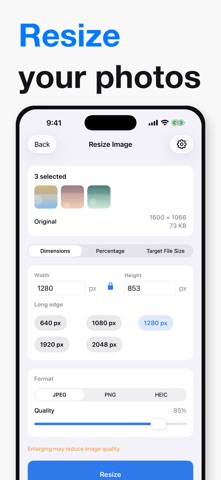
Enter the width and height you need. Keep the original aspect ratio or unlock it when an exact size is required.
• Resize by percentage
Quickly scale images to 25%, 50%, 75%, or a custom percentage.
• Target file size
Need an image under 200 KB, 500 KB, 1 MB or another limit? Choose a target size and the app adjusts quality and resolution to fit.
• Batch resize
Select multiple photos and apply the same settings to all of them at once.
• JPEG, PNG and HEIC
Choose the output format that works best for you and adjust image quality when available.
• Before and after
See the original dimensions and file size alongside the resized result.
• Easy export
Save to Photos, save to Files, or share with other apps.
• Remembers your settings
Your last resize settings stay ready for the next image.
PRIVATE IMAGE PROCESSING
Image resizing is performed on your device. Your photos are not uploaded to our own image-processing server and no account is required.
The app is free to use with advertising. An optional one-time purchase is available to remove ads.
Choose one or multiple images, set the size you need, and save the result in just a few steps. The app is designed for everyday image resizing without complicated editing tools.
KEY FEATURES
• Exact pixel size
Enter the width and height you need. Keep the original aspect ratio or unlock it when an exact size is required.
• Resize by percentage
Quickly scale images to 25%, 50%, 75%, or a custom percentage.
• Target file size
Need an image under 200 KB, 500 KB, 1 MB or another limit? Choose a target size and the app adjusts quality and resolution to fit.
• Batch resize
Select multiple photos and apply the same settings to all of them at once.
• JPEG, PNG and HEIC
Choose the output format that works best for you and adjust image quality when available.
• Before and after
See the original dimensions and file size alongside the resized result.
• Easy export
Save to Photos, save to Files, or share with other apps.
• Remembers your settings
Your last resize settings stay ready for the next image.
PRIVATE IMAGE PROCESSING
Image resizing is performed on your device. Your photos are not uploaded to our own image-processing server and no account is required.
The app is free to use with advertising. An optional one-time purchase is available to remove ads.
A closer look


What’s new in version 1.1
Fixed handling of very large resize values and improved ad stability.


