
Photo & Video
End Credits Maker: Roll Text
By Yuya Takamoto
About End Credits Maker: Roll Text
End Credits Maker is a simple app for creating scrolling end credits videos from names, roles, staff lists, and messages. Just paste your list, review the organized credits, choose a template and video length, then export a clean scrolling credits video. It is useful for graduation videos, farewell movies, wedding videos, event videos, school projects, YouTube videos, social media clips, and memory videos. No complex video editing is required. End Credits Maker focuses on one thing: helping you quickly create a polished scrolling credits video…
Read full description
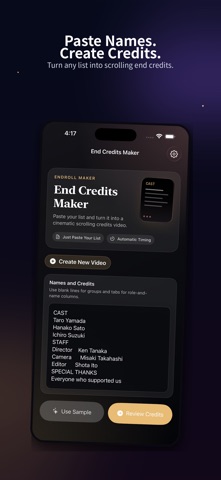
Just paste your list, review the organized credits, choose a template and video length, then export a clean scrolling credits video.
It is useful for graduation videos, farewell movies, wedding videos, event videos, school projects, YouTube videos, social media clips, and memory videos.
No complex video editing is required.
End Credits Maker focuses on one thing: helping you quickly create a polished scrolling credits video.
Main Features
• Paste names, roles, staff lists, and messages
• Organize credits into sections
• Use blank lines to separate groups
• Use tabs to split roles and names
• Single-column credits
• Role-and-name credits
• Recommended video length guidance
• Portrait 9:16 video
• Landscape 16:9 video
• 1080p MP4 export
• Save to Photos
• Share to other apps
• Classic Cinema template
• Graduation Memories template
Great For
• Graduation videos
• Farewell videos
• Wedding videos
• Event videos
• School projects
• Club or team videos
• YouTube end credits
• Social media videos
• Thank-you videos
• Memory movies
How It Works
1. Paste or type your names and credits
2. Review the automatically organized sections
3. Choose a template, duration, and aspect ratio
4. Export your video
5. Save to Photos or share anywhere
The free version lets you create Classic Cinema end credits videos.
Premium unlocks watermark removal, ad removal, the Graduation Memories template, and eligible future premium templates.
Create a beautiful ending for your video with End Credits Maker.
Terms of Use:
https://www.apple.com/legal/internet-services/itunes/dev/stdeula/
Privacy Policy:
https://docs.google.com/document/d/e/2PACX-1vS41EBWF-l8N9iz8R8nXr8RY8B5HV02YAsZ8jwt55YyCbZJPJjDFIKNtHxQtZnvCyvhn7LY4ObtbCyl/pub
A closer look


What’s new in version 1.1
Improved ad handling while purchase status is being checked or a purchase or restore is in progress. Fixed rewarded-ad handling when Premium status changes during ad preparation.


