
Health & Fitness
Tempo - Screen Time
By Aiden Magarian
Download on theApp Store ↗Free · US storefront
App Store ratingNot rated0 ratings
Age rating4+Apple content rating
CompatibilityiOS 16.0+Check your device
Version1.0.3Updated 2026-09-10
About Tempo - Screen Time
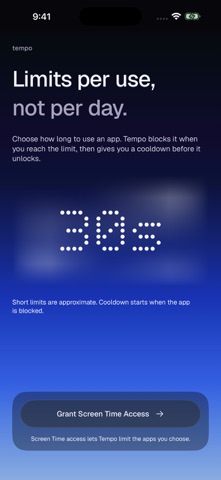
Tempo helps you keep app sessions short with per-use limits and cooldowns.
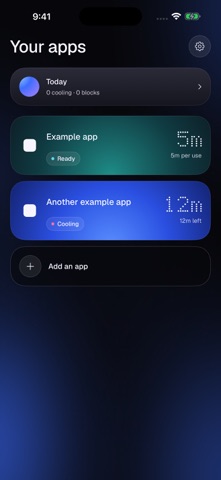
Choose the apps you want to keep in check, set a usage limit for each one, and choose how long to pause after reaching that limit. Tempo uses Apple's Screen Time system to block the app during its cooldown.
HOW IT WORKS
- Choose the apps you want to limit.
- Set a usage limit, from seconds to minutes.
- Set a cooldown before another session.
- Adjust your settings whenever you need to.
A CALMER WAY TO CHECK IN
A simple interface, clear duration controls and gently breathing blue light help you set limits without adding more distraction.
Screen Time reports usage to Tempo, so short limits are approximate and blocking may be delayed. Brief switches between apps may remain part of the same session. Cooldown starts when the app is blocked.
PRIVATE BY DESIGN
Your usage information stays on your device. No accounts, advertising or tracking.
Tempo is for limiting your own apps on your own iPhone.
Choose the apps you want to keep in check, set a usage limit for each one, and choose how long to pause after reaching that limit. Tempo uses Apple's Screen Time system to block the app during its cooldown.
HOW IT WORKS
- Choose the apps you want to limit.
- Set a usage limit, from seconds to minutes.
- Set a cooldown before another session.
- Adjust your settings whenever you need to.
A CALMER WAY TO CHECK IN
A simple interface, clear duration controls and gently breathing blue light help you set limits without adding more distraction.
Screen Time reports usage to Tempo, so short limits are approximate and blocking may be delayed. Brief switches between apps may remain part of the same session. Cooldown starts when the app is blocked.
PRIVATE BY DESIGN
Your usage information stays on your device. No accounts, advertising or tracking.
Tempo is for limiting your own apps on your own iPhone.
A closer look

What’s new in version 1.0.3
A calmer, redesigned Tempo.
• New interface with softly breathing blue edge light.
• Clearer app settings and easier-to-drag duration controls.
• Haptic feedback when changing time limits and cooldowns.
• A new open-arc app icon.
• Reliability improvements and accessibility refinements.


