
Photo & Video
Snapseed: Photo Editor, Camera
By Google
About Snapseed: Photo Editor, Camera
Snapseed is a complete and professional photo editor developed by Google. Pro-level tools, authentic film simulations, smart masking and more — all with no strings attached. == KEY FEATURES == • No Strings Attached: Get 30+ pro tools and filters - no subscriptions, purchases, ads, or watermarks • Vintage Styles: realistic film filters, plus Halation, Bloom, and Grain tools • Smart Masking: Instantly and intelligently isolate subjects or backgrounds with a single tap for fast, targeted edits • Batch Editing: Quickly apply your favorite looks an…
Read full description
== KEY FEATURES ==
• No Strings Attached: Get 30+ pro tools and filters - no subscriptions, purchases, ads, or watermarks
• Vintage Styles: realistic film filters, plus Halation, Bloom, and Grain tools
• Smart Masking: Instantly and intelligently isolate subjects or backgrounds with a single tap for fast, targeted edits
• Batch Editing: Quickly apply your favorite looks and edits to multiple photos
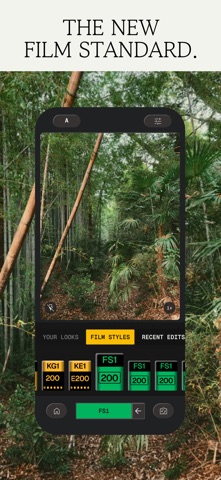
• Snapseed Camera: Capture using custom styles or film looks. Save time with real-time effects that can be edited or reset later
• Non-destructive Editing: Easily undo changes or revert to your original photo at any time
• RAW Support: Open and edit JPG and RAW files with precise control
== PRO TOOLS & FILTERS ==
• Snapseed Camera: shoot directly in your favorite film simulations or custom looks to capture your unique style in real-time and skip the editing step
• Adjust: adjust exposure and color automatically or manually with fine, precise control
• One-Touch Masking: instantly select subjects or backgrounds with smart precision for seamless targeted edits
• Selective: precisely adjust brightness, contrast, or saturation in specific areas without affecting the rest of your photo
• Healing: remove the uninvited neighbor from a group picture
• Film: get beautiful looks with our completely updated, realistic film simulations of historic film stocks
• Batch Edit: apply your custom looks and edits to an entire batch of photos instantly
• Halation: add an authentic highlight glow to replicate classic analog lens effects
• Bloom: create a soft, dreamy optical diffusion to light sources for a cinematic finish
• Motion Blur: add a sense of speed with realistic motion trails — blur the background for a panning shot, or the subject to emphasize movement
• RAW Develop: open and tweak some RAW file types
• Double Exposure: combine two photos using blend modes inspired by film and digital processing
• Portrait: modern tools to quickly enhance lighting, adjust poses, and refine facial features
• Details: magically brings out surface structures in images
• Crop and rotate: crop to standard sizes, rotate by 90°, or straighten a skewed horizon.
• Perspective: fix skewed lines and perfect the geometry of horizons or buildings
• White Balance: adjust the colors so that the image looks more natural
• Brush: selectively retouch exposure, saturation, brightness or warmth
• Vignette: darken image corners for a classic photographic effect
• Curves: have precise control over the brightness levels in your photos
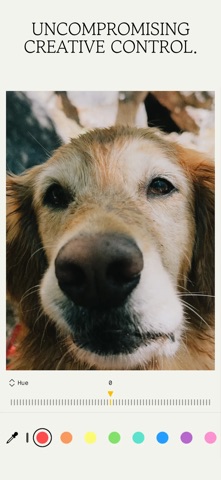
• Color HSL: precisely adjust hue, saturation, and luminance of any color
• Dehaze: instantly clear haze, fog, or glare for better contrast and detail
• Expand: increase the size of your canvas
• Lens Blur: add a beautiful Bokeh to images (background softening)
• Glow: add a fine glow to images, great for fashion or portraits
• Tonality: boost details selectively in the shadows, midtones and highlights
• Black & White: classic Black and White look straight out of the darkroom
• and more!
A closer look



What’s new in version 4.2.0
New tools, more ways to play with blur, and more Looks to explore. This update brings two new blur effects, a brand new Color Grade tool, Looks from fellow photographers, and an easy way to bring your favorite presets along:
• Capture the feeling of speed with Motion Blur: Transform static photos into dynamic stories. Blur the whole scene, streak the background behind a sharp subject for a panning effect, or put the motion on the subject itself.
• Blur by depth in Lens Blur: Choose Depth and Snapseed uses the depth of your scene to soften the background naturally, like a wide-aperture lens. Turn up Bokeh Boost to make highlights bloom into creamy bokeh.
• Set the mood with Color Grade: Give your photos a cinematic style by tinting the Shadows, Midtones, and Highlights separately with easy-to-use color wheels, or color the whole image at once. Then fine-tune how the tones blend for a smooth, polished finish.
• Import and share presets and LUTs: Bring your presets and LUTs into Snapseed in a few taps. You can also share your own Looks, with the option to include the LUTs they use.
• Discover #SnapseedLook: Browse Looks made by photographers on their own photos, with every adjustment intact. Tap one to try it, open the recipe to see how it was built, then make it your own. Tag your edits with #SnapseedLook to be featured.
we can't wait to see your looks,
team snapseed


