Productivity
OnePDF: Scanner & Editor
By Nguyen Thi Thu Huong
Download on theApp Store ↗Free · US storefront
App Store ratingNot rated0 ratings
Age rating4+Apple content rating
CompatibilityiOS 16.0+Check your device
Version1.0.0Updated 2026-06-16
About OnePDF: Scanner & Editor
OnePDF is your complete PDF workspace for iPhone and iPad. Scan documents, convert files, edit PDFs, sign contracts, organize paperwork and protect sensitive information — all in one powerful app. SCAN & OCR • Scan documents with automatic edge detection • Create multi-page PDFs in seconds • OCR text recognition • Search, select and copy text from scans • Turn paper documents into searchable PDFs CONVERT FILES • Word to PDF • Excel to PDF • Photos to PDF • Image to Text • Create PDFs from blank pages • Import files from Files, iCloud Drive and…
Read full description
OnePDF is your complete PDF workspace for iPhone and iPad.
Scan documents, convert files, edit PDFs, sign contracts, organize paperwork and protect sensitive information — all in one powerful app.
SCAN & OCR
• Scan documents with automatic edge detection
• Create multi-page PDFs in seconds
• OCR text recognition
• Search, select and copy text from scans
• Turn paper documents into searchable PDFs
CONVERT FILES
• Word to PDF
• Excel to PDF
• Photos to PDF
• Image to Text
• Create PDFs from blank pages
• Import files from Files, iCloud Drive and Dropbox
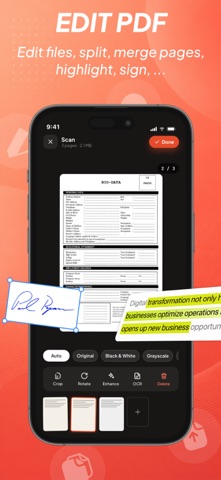
EDIT PDFs
• Merge PDF files
• Split PDF pages
• Reorder pages
• Rotate pages
• Compress PDF size
• Add text and images
• Draw and annotate
• Fill PDF forms
• Redact sensitive information
SIGN & PROTECT
• Sign documents electronically
• Password protect PDFs
• AES-256 PDF encryption
• Face ID app lock
• Watermark documents
• Add page numbers
• Crop PDF pages
ORGANIZE YOUR FILES
• Powerful file manager
• Favorites and recent documents
• Smart search
• 30-day trash recovery
• Dark Mode support
• Available in 14 languages
ONEPDF PREMIUM
Unlock unlimited conversions, all PDF tools, larger files, batch processing and an ad-free experience.
Subscriptions automatically renew unless canceled at least 24 hours before the end of the current period.
Read more about Terms of Use: https://www.apple.com/legal/internet-services/itunes/dev/stdeula/
Scan documents, convert files, edit PDFs, sign contracts, organize paperwork and protect sensitive information — all in one powerful app.
SCAN & OCR
• Scan documents with automatic edge detection
• Create multi-page PDFs in seconds
• OCR text recognition
• Search, select and copy text from scans
• Turn paper documents into searchable PDFs
CONVERT FILES
• Word to PDF
• Excel to PDF
• Photos to PDF
• Image to Text
• Create PDFs from blank pages
• Import files from Files, iCloud Drive and Dropbox
EDIT PDFs
• Merge PDF files
• Split PDF pages
• Reorder pages
• Rotate pages
• Compress PDF size
• Add text and images
• Draw and annotate
• Fill PDF forms
• Redact sensitive information
SIGN & PROTECT
• Sign documents electronically
• Password protect PDFs
• AES-256 PDF encryption
• Face ID app lock
• Watermark documents
• Add page numbers
• Crop PDF pages
ORGANIZE YOUR FILES
• Powerful file manager
• Favorites and recent documents
• Smart search
• 30-day trash recovery
• Dark Mode support
• Available in 14 languages
ONEPDF PREMIUM
Unlock unlimited conversions, all PDF tools, larger files, batch processing and an ad-free experience.
Subscriptions automatically renew unless canceled at least 24 hours before the end of the current period.
Read more about Terms of Use: https://www.apple.com/legal/internet-services/itunes/dev/stdeula/
A closer look